Technical Support
Tips & Tricks
View all-

FAQs for Smart AI Voice Recorder
Discover everything you need to know about the Smart AI Voice Recorder in this complete FAQ guide. Learn how to record, transcribe, transfer files, check battery status, and get the...
FAQs for Smart AI Voice Recorder
Discover everything you need to know about the Smart AI Voice Recorder in this complete FAQ guide. Learn how to record, transcribe, transfer files, check battery status, and get the...
-

FAQs for Digital Voice Recorder
Get quick answers to the most common questions about using a digital voice recorder. Learn how to record clear audio, adjust mic sensitivity, save storage, and more. Perfect for beginners...
FAQs for Digital Voice Recorder
Get quick answers to the most common questions about using a digital voice recorder. Learn how to record clear audio, adjust mic sensitivity, save storage, and more. Perfect for beginners...
-

FAQs for Pen Voice Recorder
Discover everything you need to know about using a pen voice recorder in this quick FAQ guide. From how to start recording, save files, adjust settings, and play back audio...
FAQs for Pen Voice Recorder
Discover everything you need to know about using a pen voice recorder in this quick FAQ guide. From how to start recording, save files, adjust settings, and play back audio...
-

FAQs for Mini Voice Recorder
Got questions about your mini voice recorder? This quick FAQ guide covers everything you need to know—from how to use the voice activated recorder feature to where you can hide...
FAQs for Mini Voice Recorder
Got questions about your mini voice recorder? This quick FAQ guide covers everything you need to know—from how to use the voice activated recorder feature to where you can hide...


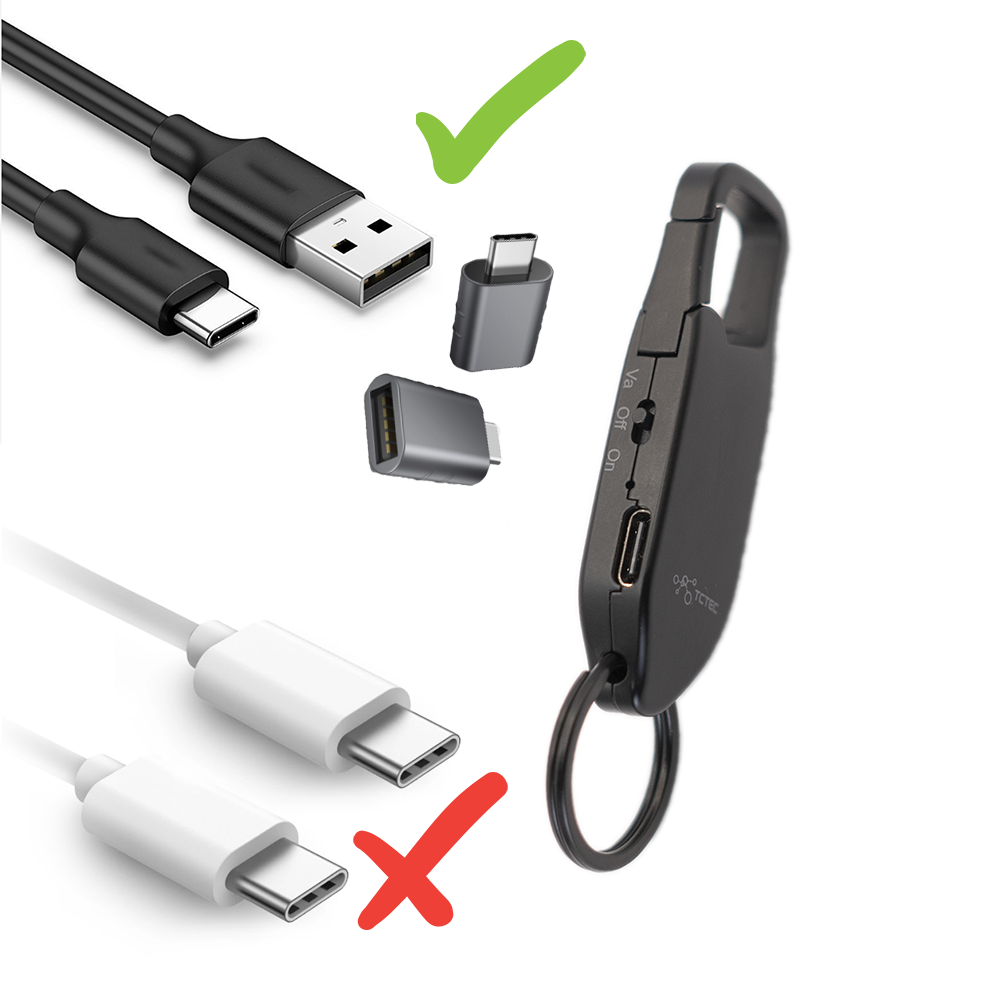
Connectivity Troubleshooting
Please note that using a USB-C to USB-C cable to connect our device to a computer, especially a Macbook, will not work.
Please use the provided USB to USB-C cable instead. If your computer doesn't have a USB port, you can use a USB to USB-C converter.
If you don't have one, contact our customer service via chat or email, and we'll send you one free of charge.


Featured collection
-
Hidden Keychain Voice Recorder
Regular price From $59.99 USDRegular priceUnit price per$69.99 USDSale price From $59.99 USDSale -
Secret Voice Recording Pen
Regular price $49.99 USDRegular priceUnit price per$59.99 USDSale price $49.99 USDSale -
Digital Voice Recorder
Regular price $65.99 USDRegular priceUnit price per$69.99 USDSale price $65.99 USDSale


